

A dedicated dental scanning system built for daily chairside use - from day one.
AIDENT lScan is a focused operational system built around the one thing your clinic does every day - scanning. It is designed from the ground up for exactly that purpose, combining AI-powered scanning intelligence with an open, cloud-connected workflow.
Extremely Easy to Use: New assistants can master it in 1–2 days
AI-Powered Intelligence: Smart scan filtering, smart re-scan, margin detection
Real-Time True Color: High-quality color 3D models during scanning → higher patient acceptance
Lifetime Free Upgrades: All software updates are free for life for AI-30 and AI-50 owners - no subscription, no license keys.
Fully Open System: Standard STL/PLY/OBJ export, perfect compatibility with major CAD software
Safe Cloud Storage & 3D Data Sharing:Securely manage digital files from anywhere and share 3D dental data effortlessly for better clinic–lab collaboration.

New with AI-50: Reports & Simulation You Can Show the Patient
Same AIDENT lScan workflow - two AI-50-exclusive features that help patients say yes at the chairside.
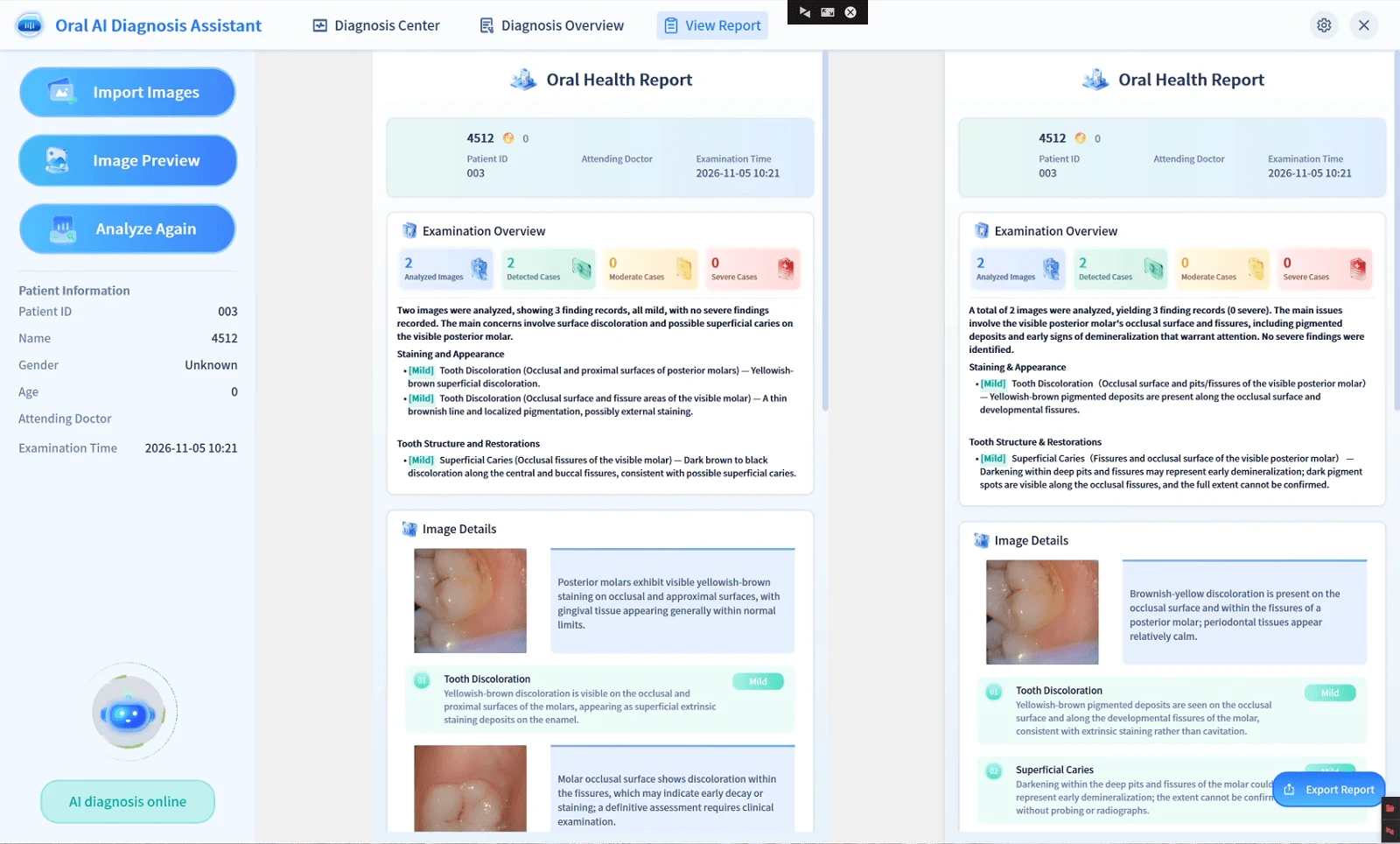
AI Oral Assessment Report
lScan automatically filters problem-tooth scans, lists issues tooth by tooth with severity labels (mild, moderate and more), and adds personalized suggestions. Reports can be generated from completed orders - a clear, shareable summary of the patient's oral status.
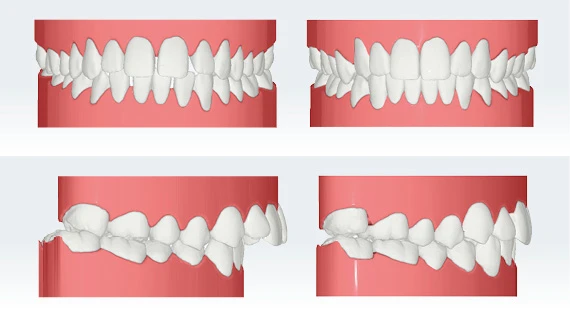
Orthodontic Simulation
Visualize tooth movement before treatment. Show patients what change could look like during the case conversation - an open-system tool that isn't tied to a single aligner brand's ecosystem.
Under the hood, the AI-50 scans at ≤7 μm single-tooth accuracy (0.007 mm), weighs just 145 g and captures at 38+ fps - all running the same AIDENT lScan workflow your team already knows. No new software to learn when you upgrade.
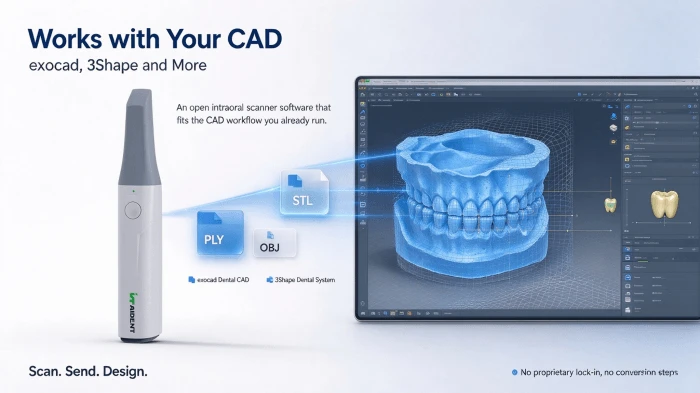
Works with Your CAD - exocad, 3Shape and More
An open intraoral scanner software that fits the CAD workflow you already run.
AIDENT lScan exports standard STL, PLY and OBJ files, so your cases import cleanly into the dental CAD software you already use - including exocad Dental CAD, 3Shape Dental System and other major open platforms. No proprietary lock-in, no conversion steps: scan chairside, send the file, design in your CAD of choice.
For clinics that work with external labs, open export means your lab keeps its existing CAD workflow while you keep full control of your scan data. See our guide on dental lab scanner compatibility with exocad for a deeper dive.
Three steps. One logic. Every time.
A repeatable workflow any staff member can run confidently - from the first day on the job.
01 CREATE
CREATE
- Instant start – no complex setup barrier
- Patient info entry streamlined
- Consistent case creation across all staff
02 SCAN
Execute the Scan
- Streamlined UI – essential tools only
- Guided workflow reduces operator decisions
- Consistent results regardless of operator
- Real-time feedback for accuracy
03 SEND
Complete & Submit
- Clear review step before submission
- Simple order submission interface
- Transparent order tracking & visibility
- Reduced lab back-and-forth
Cloud Storage & Data Management
We provide 5GB of cloud storage as standard for every AIdent Intraoral Scanner user at no extra cost.
Need more space? Upgrade to +10GB (total 15GB) for only $10 per quarter.
When you reach the 5GB storage limit, you have two options
Free up space - Delete completed cases in Order Management to immediately release space.
Upgrade storage - Add 10GB for $10/quarter for long-term data retention.
Storage Expiration Notes
If you do not renew the expanded storage plan, we provide a 30-day grace period before any data deletion.
After the grace period, the system will automatically delete the oldest data first to stay within the default 5GB capacity.
Software Updates & Downloads
Free for life - installed right inside the software.
AIDENT lScan updates are released regularly and are free for life for every AIdent Intraoral Scanner owner. Updates install directly from the software's update center - no separate download portal, no license keys, no extra cost. Each release brings new AI features, faster processing and expanded language support: English, Spanish, French, Korean, Japanese, Chinese, Italian and Russian.
FAQ
Everything clinics ask about AIDENT lScan before they start.
Q: 1. Which scanners does the software support?
A: AIDENT lScan works with both the Aident AI-30 and the AI-50 Intraoral Scanners - one software platform across the whole scanner lineup.
Q: 2. Is the software free?
A: Yes. It is included with both the AI-30 and AI-50 and offers free lifetime upgrades.
Q: 3. Does it support multiple languages?
A: Yes - English, Spanish, French, Korean, Japanese, Chinese, Italian and Russian.
Q: 4. Can I use the data with other CAD systems?
A: Absolutely. Fully open system - standard STL/PLY/OBJ export compatible with major dental CAD platforms.
Q: 5. Can I download my cases locally?
A: Yes, anytime. This is recommended to keep cloud space available.
Q: 6. Is AIDENT lScan compatible with exocad?
A: Yes. lScan exports standard STL/PLY/OBJ files that import directly into exocad Dental CAD and other open CAD platforms.
Q: 7. Can I use the software on multiple PCs at the clinic?
A: Yes - install lScan on your clinic workstations and manage cases via the included 5GB cloud storage with multi-device sync.
Q: 8. What's new in the software with the AI-50?
A: The AI-50 adds two lScan features: the AI Oral Assessment Report (problem-tooth screening with severity labels and personalized suggestions) and Orthodontic Simulation (visualize tooth movement before treatment). Both are included with the AI-50 - no extra subscription.