Introduction: A New Era for Dental Laboratories
Dental laboratories are undergoing a fundamental transformation. Traditional production methods that depend heavily on physical impressions, gypsum models and manual processing are increasingly being complemented by digital technologies.
Today, a modern dental laboratory can combine 3D scanning, computer-aided design (CAD), computer-aided manufacturing (CAM) and dental 3D printing to create a more connected production process.
This transformation is not simply about replacing manual tools with digital equipment. It is about improving how laboratories receive case data, design restorations, manufacture dental models, manage production capacity and collaborate with dental clinics.
For laboratory owners and technicians, understanding the digital dentistry workflow is becoming essential when planning equipment investments and long-term business growth.
1. From Traditional Impressions to Digital Data
Traditional dental laboratory workflows often begin with a physical impression or a gypsum model sent by a dental clinic. Technicians must inspect the incoming case, prepare the model and manually complete several processing steps before design and manufacturing can begin.
Digital workflows offer another approach.
With an intraoral scanner, a clinic can capture digital impressions and transfer the data to the laboratory. A dental lab scanner can also digitize physical models, dies and other compatible objects when a case requires it.
Digital files provide a consistent starting point for CAD design and downstream manufacturing, provided that the scan data is complete and accurate.
How digital scanning changes laboratory operations
Less manual model preparation: Digital impression workflows can reduce the need for pouring and trimming physical models in applicable cases.
Faster data transfer: Digital files can be shared electronically instead of relying on physical delivery.
Easier case communication: Technicians and clinicians can review the same digital information and identify missing or unclear details earlier.
Digital case archiving: Files can be stored and retrieved without keeping every physical model, subject to appropriate data management and retention policies.
Digital scanning does not eliminate every manual step. Physical models remain useful for certain applications, and scan quality still depends on the equipment, scanning technique and case conditions.
The key advantage is flexibility: laboratories can select the most appropriate digital or conventional process for each case.
2. Dental Lab Scanners Improve Data Acquisition
A dental lab scanner is an important component of a digital dentistry workflow. It converts physical objects into three-dimensional data that can be used in CAD software and subsequent production stages.
For laboratories handling crowns, bridges, implant cases and other restorative work, scanner performance affects the quality of the digital information available to technicians.
When evaluating a dental lab scanner, laboratories should consider more than the headline accuracy specification.
Important factors include:
Scanning accuracy: Whether the scanner can capture the details required for the intended application under defined testing conditions.
Full-arch scanning performance: How efficiently the system captures larger models and complex geometries.
Margin and surface detail: Whether critical areas are captured clearly enough for the intended design.
Software compatibility: Whether the scanner supports suitable file formats and integrates with the laboratory's existing CAD software.
Workflow automation: Whether automated alignment, rescanning and data-processing functions reduce repetitive work.
Ease of operation: Whether technicians can learn and use the system efficiently in daily production.
A high-performing scanner can help reduce unnecessary data correction and make downstream design more predictable. However, scanning accuracy alone does not guarantee restoration fit; design quality, manufacturing accuracy, materials and clinical conditions also matter.
For laboratories planning a digital upgrade, the goal should be to choose a scanner that fits their actual case volume, application requirements and existing software environment.
3. Dental 3D Printing Changes How Laboratories Manufacture Products
Dental 3D printing has expanded the range of products that laboratories can manufacture directly from digital designs.
Depending on the printer, material and validated application, laboratories may use additive manufacturing to produce:
Diagnostic and working models
Implant surgical guides
Clear-aligner and orthodontic models
Denture-related components and try-in parts
Wax-up patterns and other laboratory components
Selected temporary restorations using suitable materials and validated workflows
Instead of producing every item through traditional model fabrication or outsourcing, laboratories can manufacture suitable components in-house.
Why a 3D printer for a dental laboratory matters
A dental 3D printer can help laboratories organize production around digital files rather than individual manual fabrication steps.
Multiple suitable models may be arranged on a build platform and produced in one batch. This can improve equipment utilization and allow technicians to handle several cases within a more structured production schedule.
The actual benefit depends on build volume, print settings, model geometry, layer height, material properties and post-processing requirements.
When comparing printers, laboratories should evaluate:
| Evaluation factor | Why it matters |
|---|---|
| Build volume | Determines how many suitable parts can fit into a production batch |
| Dimensional accuracy | Affects whether printed parts meet application-specific requirements |
| Printing speed | Influences production planning and delivery schedules |
| Material compatibility | Determines which applications the printer can support |
| Software and file support | Affects integration with existing design systems |
| Maintenance and service | Influences downtime and long-term operating costs |
| Post-processing | Includes washing, curing and other steps required by the material |
A printer with a large build platform may be attractive for high-volume model production, while a smaller system may be more appropriate for laboratories with limited space or lower daily demand.
The right choice depends on the laboratory's production mix rather than a single specification.
4. Dental 3D Printing Resins Expand Application Options
Hardware is only one part of a reliable digital manufacturing system. Material selection is equally important.
Different dental applications require different material properties. A resin designed for diagnostic models should not automatically be assumed suitable for surgical guides, temporary restorations or other applications.
Laboratories should select materials according to their intended use and the manufacturer's instructions.
Common material categories include:
Dental model resin: Used for suitable diagnostic and working models.
Surgical guide resin: Intended for surgical guide applications when the material and complete workflow meet the relevant requirements.
Gingiva resin: Used to simulate soft-tissue structures in compatible dental models.
Temporary crown and bridge resin: Intended for specified temporary restorative applications, subject to applicable indications and instructions.
Tray resin: Used for compatible custom tray applications.
Specialized model materials: Developed for particular model-production requirements, such as improved heat resistance or washability.
Before adopting a new resin, laboratories should check printer compatibility, required curing conditions, dimensional stability, mechanical properties and applicable regulatory documentation.
A resin that performs well in one application may not be appropriate for another. Reliable production requires the printer, material, software settings and post-processing procedure to work together.
5. CAD/CAM Integration Connects the Entire Digital Workflow
Digital equipment delivers greater value when the different stages work together.
A typical digital laboratory workflow can be organized into five stages:
Step 1: Data acquisition
Receive an intraoral scan from a clinic or scan a physical model with a laboratory scanner.
Step 2: Digital design
Import the data into compatible CAD software. The technician reviews the geometry and creates the required restoration, model or appliance design.
Step 3: Production preparation
Check the design, select the appropriate manufacturing method, orient parts and prepare the production file.
Step 4: Manufacturing
Produce the component using a suitable dental 3D printer or another compatible manufacturing system.
Step 5: Quality control and delivery
Complete the required washing, curing, finishing and inspection steps before releasing the product.
A connected workflow makes it easier to identify bottlenecks and establish repeatable procedures.
For example, if production is delayed because technicians spend too much time correcting scan data, purchasing a faster printer may not solve the main problem. If scanning and design are already efficient but the laboratory cannot meet demand, additional printing capacity may be more valuable.
The most effective investment addresses the actual production constraint.
6. How Digital Technology Can Improve Laboratory Productivity
The business case for digital dentistry should be measured using operational data rather than equipment specifications alone.
Potential benefits include:
Shorter production cycles
Digital file transfer and in-house manufacturing can remove certain physical handling and outsourcing steps. The total turnaround time still depends on design workload, machine availability, post-processing and quality control.
More predictable production
Standardized digital procedures can help technicians repeat established workflows and identify deviations earlier.
Lower manual workload
Automation can reduce selected repetitive tasks, allowing technicians to focus on design review, complex cases and quality assurance.
Better production planning
Digital files and batch manufacturing can make it easier to group compatible cases and use available machine capacity.
Greater control over outsourcing
Producing suitable items internally can reduce dependence on external providers, although outsourcing may remain economical for specialized or low-volume work.
Laboratories should track several key performance indicators before and after adopting new technology:
Average turnaround time per case
Remake rate and reasons for remakes
Technician hours per case
Equipment utilization
Material cost per finished unit
Maintenance and downtime
Percentage of cases produced in-house
These metrics provide a more useful basis for investment decisions than claims about speed or productivity without a defined testing environment.
7. How to Calculate the ROI of Digital Dental Equipment
Before purchasing a dental lab scanner or 3D printer, laboratory owners should estimate the total cost of ownership.
A basic calculation is:
Monthly net benefit = Monthly operating savings + Additional contribution from new production − Additional monthly operating costs
Operating savings may include reduced outsourcing expenditure, lower material waste or fewer labor hours spent on specific tasks.
Additional operating costs may include equipment financing or depreciation, resin and other consumables, maintenance, software, labor, electricity and post-processing.
For example, a laboratory that currently outsources a high volume of suitable model production may benefit from bringing some of that work in-house. A laboratory with very low demand, however, may find that outsourcing remains more economical.
The decision should be based on actual case volume, current outsourcing costs, expected utilization and the equipment's validated capabilities.
A practical evaluation should compare several scenarios:
Continue using the existing workflow.
Introduce a dental lab scanner while retaining the current manufacturing process.
Add a dental 3D printer for selected applications.
Integrate scanning, CAD design and in-house printing into a broader digital workflow.
This approach helps laboratory owners identify which investment is likely to deliver the greatest operational benefit.
8. How to Choose a Digital Dentistry Equipment Manufacturer
As digital dentistry becomes more integrated, laboratories need suppliers that can support not only individual devices but also their wider production requirements.
When evaluating a dental equipment manufacturer, consider the following questions.
Does the equipment fit your applications?
Check scanning requirements, build volume, supported materials and the types of cases the system is designed to handle.
Can the equipment integrate with your existing software?
Confirm supported file formats, CAD/CAM compatibility and any workflow limitations before purchasing.
Is technical documentation available?
Request specifications, operating instructions, validation information where applicable and clear guidance on material compatibility.
What support is available after purchase?
Ask about installation, training, troubleshooting, spare parts, warranty terms and service response arrangements.
Can the supplier support future growth?
Consider whether the manufacturer offers a suitable product range, consistent material supply and technical support as production requirements change.
For distributors and OEM/ODM buyers, additional considerations include manufacturing capability, quality-control procedures, customization scope, regulatory documentation and export support. These should be verified directly with the supplier rather than assumed from marketing materials.
9. Building a Practical Digital Workflow with Aident3D
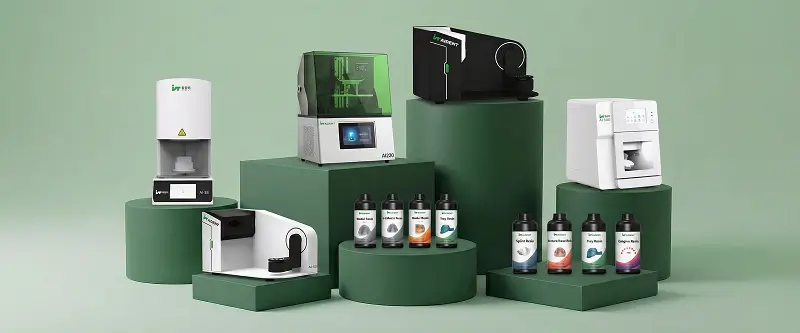
Aident3D provides dental scanning systems, dental 3D printers and application-specific dental 3D printing resins for digital dentistry workflows.
Laboratories evaluating an upgrade can consider a staged approach:
Start with data acquisition: Evaluate whether an Aident laboratory scanner can meet the laboratory's scanning and software requirements.
Identify suitable printing applications: Determine which models or other components can be manufactured reliably in-house.
Select compatible materials: Match the printer and resin to the intended application and required processing procedure.
Integrate the workflow: Verify file transfer, CAD compatibility, production preparation and post-processing.
Measure the results: Compare turnaround time, remakes, operating costs and machine utilization after implementation.
A staged upgrade allows laboratories to validate equipment performance before committing to a larger investment.
Explore Aident3D's dental laboratory scanners, dental 3D printers and dental 3D printing resins, and evaluate which solutions fit your production requirements.
Frequently Asked Questions
How is 3D technology changing dental laboratories?
3D technology is enabling laboratories to capture digital data, design products using CAD software and manufacture selected dental components using 3D printing. These capabilities can reduce certain manual steps, improve production planning and support more connected workflows.
What equipment does a digital dental laboratory need?
Requirements vary by laboratory. A typical setup may include a dental lab scanner, CAD software, a suitable dental 3D printer, compatible materials and the equipment required for washing, curing and quality control.
Can dental laboratories use 3D printing instead of traditional manufacturing?
3D printing is suitable for many dental laboratory applications, but it does not replace every conventional manufacturing process. Material requirements, product geometry, equipment capabilities and regulatory considerations determine the appropriate method.
How do I choose a dental 3D printer for my laboratory?
Compare build volume, dimensional accuracy, throughput, material compatibility, software integration, maintenance requirements and total cost of ownership. Evaluate these factors against your daily case volume and intended applications.
Does a dental lab scanner work with different CAD software?
Compatibility depends on the scanner, software and supported file formats. Before purchasing, confirm that the scanner can export the data your laboratory needs and that the intended CAD software can import and process it correctly.
Is digital dentistry suitable for small dental laboratories?
It can be. Smaller laboratories can begin with the equipment that addresses their most significant bottleneck, then expand as case volume and business requirements grow. Outsourcing may remain appropriate for some applications.
How can laboratories measure the ROI of digital equipment?
Track equipment and material costs, outsourcing expenditure, labor hours, turnaround time, remakes and production utilization. Compare the results with the previous workflow over a representative period.
Conclusion: Digital Integration Is the Next Step for Dental Laboratories
The transformation of dental laboratories is not driven by one machine alone. It comes from connecting digital scanning, CAD/CAM design, additive manufacturing, appropriate materials and consistent quality-control procedures.
Laboratories that evaluate these technologies against their real production needs can make more informed investment decisions, improve workflow visibility and build a more scalable manufacturing process.
Whether you are upgrading an existing laboratory or planning a new digital production line, start by identifying your main bottleneck and selecting equipment that addresses it.
Ready to evaluate your digital dental laboratory workflow? Contact Aident3D to discuss laboratory scanning, dental 3D printing, compatible resins and equipment options for your production requirements.
Explore Aident3D | Contact the Aident3D team